
Blended Overtime Paystub Template: How to Calculate Weighted Average Overtime for Dual-Rate Employees
Key Takeaways
- ✓The FLSA Weighted Average Mandate: Under federal law (29 C.F.R. § 778.115), when a non-exempt employee works at two or more different pay rates in a single workweek, employers cannot simply calculate overtime at 1.5× their primary rate or the rate in effect during the overtime hours. Overtime must be calculated using a weighted average Regular Rate of Pay (RROP).
- ✓The 0.5× Half-Time Overtime Formula: Because straight-time compensation for all hours worked is already factored into total weekly earnings, the overtime premium is calculated as
Overtime Hours × (Weighted RROP × 0.5), not 1.5×. Applying 1.5× to straight-time already tallied results in massive payroll overpayments. - ✓Non-Discretionary Bonuses Must Be Included: Production incentives, attendance bonuses, hazard pay, and shift differentials must be added to total straight-time earnings before dividing by total hours to determine the statutory blended regular rate.
- ✓Mandatory Paystub Line-Item Itemization: Under state wage transparency statutes (e.g., California Labor Code § 226, New York WTPA), paystubs must explicitly itemize hours worked at each distinct pay rate, the calculated blended regular rate, and the separate overtime premium amount.
- ✓Automate Dual-Rate Payroll with PayslipGen: Using PayslipGen, payroll administrators can import multi-rate Excel spreadsheets and batch generate audit-ready, password-protected PDF paystubs locally in seconds with zero cloud subscription fees.
In modern agile workplaces, employee responsibilities are rarely confined to a single rigid job description. Across healthcare facilities, manufacturing plants, hospitality venues, construction sites, and retail chains, cross-trained staff routinely perform multiple roles at varying wage rates during the same workweek.
A registered dental assistant might perform clinical duties at $28.00/hour on Monday and Tuesday, then transition to front-desk administration at $19.00/hour on Thursday and Friday. A CNC machine operator earning $26.00/hour might pick up weekend warehouse packaging shifts at $18.00/hour. A certified nursing assistant (CNA) earning $20.00/hour might cover night triage shifts that include a $4.00/hour differential.
When these dual-rate employees work more than 40 hours in a workweek, payroll administrators face one of the most litigated traps in wage-and-hour compliance: How do you calculate legally compliant overtime pay when there is no single hourly rate?
Under the Fair Labor Standards Act (FLSA 29 C.F.R. § 778.115), calculating overtime using simple unweighted averages, base job rates, or the rate active when the 41st hour was clocked is illegal unless strict advance written agreements exist. Failing to compute a true weighted average blended regular rate exposes employers to Department of Labor (DOL) audits, mandatory 100% liquidated damages, back-wage liabilities, and crippling state wage statement penalties.
In this comprehensive guide, we unpack the federal and state legal framework governing blended overtime, break down the exact mathematical formulas with real-world case studies, provide an audit-proof Excel formula blueprint, and demonstrate how to generate batch, encrypted payslips using PayslipGen.
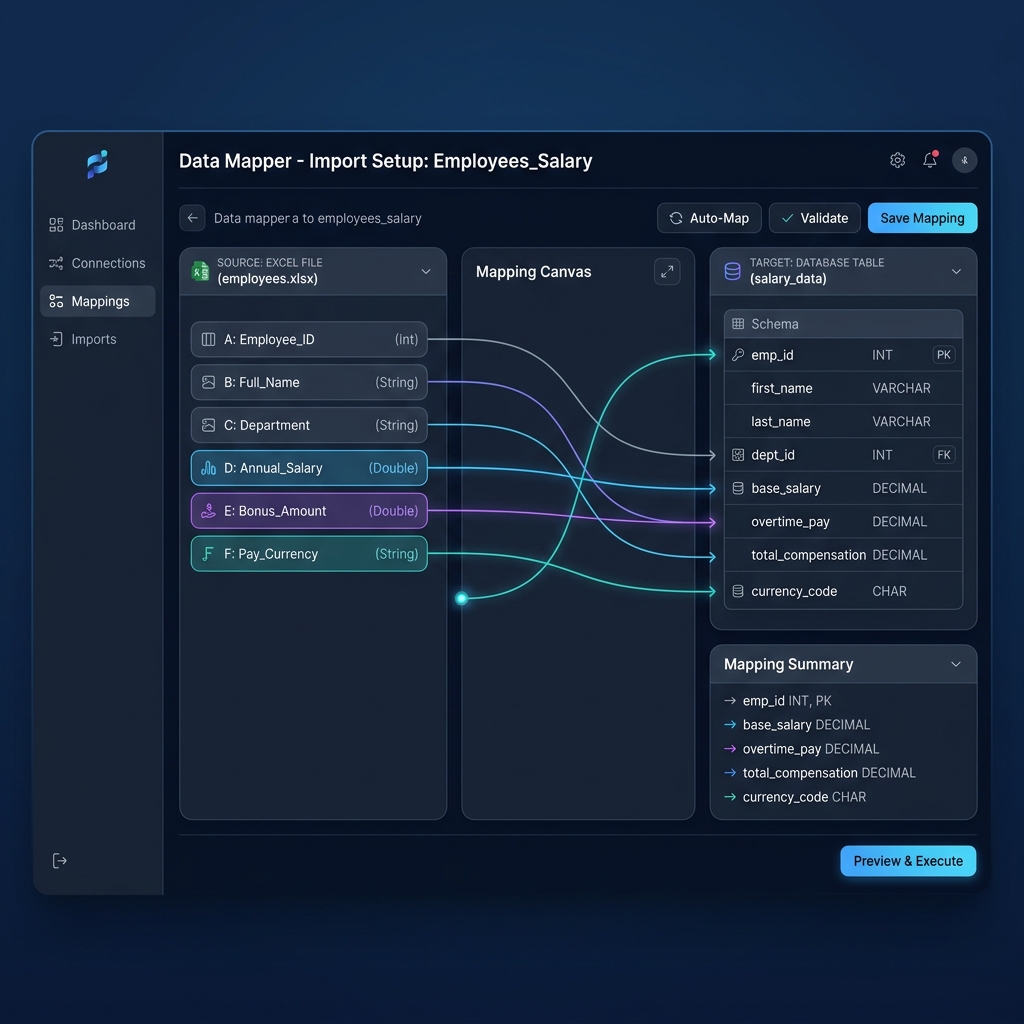
Try Our Interactive Demo Instantly
Want to see how an offline-capable, client-side payslip generator works in practice? Try our brand-new interactive demo right in your browser. Upload a sample CSV, map your columns, and generate beautifully designed PDF payslips—with zero data ever being transmitted to our servers.
Launch Free Demo NowChapter 1: The Dual-Rate Payroll Dilemma & FLSA § 778.115
When an employee earns a single static wage (e.g., $20.00/hr), computing overtime is elementary: 40 hours are paid at $20.00/hr, and all overtime hours beyond 40 are paid at 1.5× base pay ($30.00/hr).
However, when an employee works across two or more different pay rates within a single seven-day workweek, payroll systems and manual spreadsheet administrators frequently fall into three dangerous, non-compliant shortcuts.
The Three Fatal Payroll Shortcuts
Shortcut 1: The "Rate-in-Effect" Default
Paying overtime based strictly on whichever job the employee was performing when they crossed the 40-hour threshold. If an employee worked 30 hours at $25.00/hr and then 15 hours at $16.00/hr, the employer pays 1.5× $16.00 ($24.00/hr) on the 5 overtime hours. Under FLSA 29 C.F.R. § 778.115, this practice is illegal unless an explicit, authenticated prior agreement was signed before the work was performed.
Shortcut 2: The "Primary Base Rate" Calculation
Applying 1.5× to the employee's primary or default wage profile in your HRIS, completely ignoring secondary shift rates or non-discretionary bonuses earned during the week. If the secondary shift paid a higher rate, the employee is unlawfully shortchanged.
Shortcut 3: Simple Unweighted Arithmetic Average
Taking the average of the two wage rates: ($25.00 + $16.00) / 2 = $20.50/hr, and multiplying by 1.5×. This completely disregards the number of hours worked at each rate and violates statutory proportionality.
The Federal Statutory Rule: 29 C.F.R. § 778.115
The United States Department of Labor Wage and Hour Division established the definitive standard in Title 29, Code of Federal Regulations, Section 778.115 (Employees working at two or more rates):
"Where an employee in a single workweek works at two or more different types of work for which different non-overtime rates of pay (of not less than the applicable minimum wage) have been established, his regular rate for that week is the weighted average of such rates. That is, his total earnings (except statutory exclusions) from all such rates are divided by the total number of hours worked at all jobs."
In plain English: You must calculate straight-time earnings across all jobs, divide by all hours worked to establish a single weighted average Regular Rate of Pay (RROP), and then pay an additional 0.5× half-time premium on that weighted rate for every overtime hour.
Why Cloud Payroll SaaS Platforms Often Fail Dual-Rate Teams
Standard cloud payroll platforms (like basic Gusto, QuickBooks Online, or Wave) are architected around a single primary hourly rate per employee profile. When an administrator enters hours under multiple pay types or manual lines, these platforms often default to the primary rate for overtime calculations or fail to itemize the calculated blended rate on the employee's wage statement. This software limitation does not shield the employer from DOL penalties or employee wage claims.
Chapter 2: The FLSA Weighted Average Regular Rate Mathematical Formula
To ensure 100% mathematical and regulatory compliance, every dual-rate payroll calculation must follow a strict four-step process.
Multiply the hours worked at each individual rate by that specific rate. Add all non-discretionary bonuses, attendance incentives, hazard pay, and shift differentials earned in that workweek.
Divide the Total Straight-Time Earnings by the total number of actual hours worked across all roles in the workweek. This yields the statutory Blended Regular Rate.
Because straight-time pay (1.0×) for all hours was already accounted for in Step 1, multiply the overtime hours worked (hours > 40) by 50% (0.5×) of the Weighted RROP.
Add the Total Straight-Time Earnings (from Step 1) to the Overtime Premium Pay (from Step 3). This equals the total gross wages subject to standard statutory tax withholdings.
The Master Mathematical Equations
Why Is the Overtime Multiplier 0.5× Instead of 1.5×?
This is the single most common conceptual stumbling block for payroll professionals. When you multiply Hours_Rate_1 × Rate_1 and Hours_Rate_2 × Rate_2, you have already compensated the employee for 100% of their straight-time earnings for all hours worked (including the hours worked past 40). If you then added an overtime line calculated at Overtime_Hours × (RROP × 1.5), you would be paying 2.5× total pay on those overtime hours! The 0.5× multiplier supplies the additional "half-time" premium required by the FLSA to bring total overtime compensation to time-and-a-half (1.0× straight time + 0.5× premium = 1.5×).
Chapter 3: Step-by-Step Numerical Case Studies
To demonstrate how the weighted average formula applies across diverse operating environments, let us examine three detailed, real-world case studies from healthcare, manufacturing, and hospitality.
Case Study 1: Healthcare CNA / LPN Dual-Shift Float
Sarah is a healthcare worker at a skilled nursing facility. During a seven-day payroll cycle, she works two distinct roles:
- Certified Nursing Assistant (CNA) Floor Shift: 30.0 hours at $18.00/hour
- Licensed Practical Nurse (LPN) / Med-Tech Float Shift: 18.0 hours at $26.00/hour
- Total Hours Worked: 30.0 + 18.0 = 48.0 hours (8.0 hours Overtime)
Mathematical Calculation Walkthrough:
- Step 1 (Straight Time): (30 hrs × $18.00) + (18 hrs × $26.00) = $540.00 + $468.00 = $1,008.00
- Step 2 (Weighted RROP): $1,008.00 ÷ 48.0 Total Hours = $21.00/hour
- Step 3 (Overtime Premium): 8.0 OT Hours × ($21.00 × 0.5) = 8.0 × $10.50 = $84.00
- Step 4 (Total Gross Pay): $1,008.00 (Straight Time) + $84.00 (OT Premium) = $1,092.00
| Earnings Description | Hours / Units | Hourly Rate | Total Amount |
|---|---|---|---|
| CNA Floor Care (Straight Time) | 30.00 | $18.00 | $540.00 |
| LPN / Med-Tech Float (Straight Time) | 18.00 | $26.00 | $468.00 |
| Calculated Weighted Regular Rate (RROP) | 48.00 (Total) | $21.00 | — |
| FLSA Overtime Half-Time Premium (0.5× RROP) | 8.00 | $10.50 | $84.00 |
| Total Gross Weekly Compensation | 48.00 Hours | — | $1,092.00 |
Case Study 2: Manufacturing Cross-Training with Non-Discretionary Bonus
Marcus works at a precision metal manufacturing facility. In addition to operating CNC machinery, he assists the warehouse logistics crew during peak production. During this week, he also earned a $100.00 weekly non-discretionary attendance/safety bonus:
- CNC Machine Operator: 28.0 hours at $28.00/hour
- Warehouse Assembly & Packaging: 16.0 hours at $19.00/hour
- Weekly Attendance / Safety Bonus: $100.00 (Non-Discretionary)
- Total Hours Worked: 28.0 + 16.0 = 44.0 hours (4.0 hours Overtime)
Mathematical Calculation Walkthrough:
- Step 1 (Straight Time + Bonus): (28 hrs × $28.00) + (16 hrs × $19.00) + $100.00 Bonus = $784.00 + $304.00 + $100.00 = $1,188.00
- Step 2 (Weighted RROP): $1,188.00 ÷ 44.0 Total Hours = $27.00/hour
- Step 3 (Overtime Premium): 4.0 OT Hours × ($27.00 × 0.5) = 4.0 × $13.50 = $54.00
- Step 4 (Total Gross Pay): $1,188.00 (Straight Time + Bonus) + $54.00 (OT Premium) = $1,242.00
| Earnings Description | Hours / Units | Hourly Rate | Total Amount |
|---|---|---|---|
| CNC Operator (Straight Time) | 28.00 | $28.00 | $784.00 |
| Warehouse Assembly (Straight Time) | 16.00 | $19.00 | $304.00 |
| Non-Discretionary Attendance Bonus | — | — | $100.00 |
| Calculated Weighted Regular Rate (RROP) | 44.00 (Total) | $27.00 | — |
| FLSA Overtime Half-Time Premium (0.5× RROP) | 4.00 | $13.50 | $54.00 |
| Total Gross Weekly Compensation | 44.00 Hours | — | $1,242.00 |
Case Study 3: Hospitality Server & Banquet Bartender Shift Differentials
Elena works at a boutique hotel and event venue. On weekdays, she works as a dining room server, and on weekends, she works as a banquet lead bartender:
- Dining Room Server Shift: 25.0 hours at $15.00/hour
- Banquet Lead Bartender Shift: 20.0 hours at $24.00/hour
- Total Hours Worked: 25.0 + 20.0 = 45.0 hours (5.0 hours Overtime)
Mathematical Calculation Walkthrough:
- Step 1 (Straight Time): (25 hrs × $15.00) + (20 hrs × $24.00) = $375.00 + $480.00 = $855.00
- Step 2 (Weighted RROP): $855.00 ÷ 45.0 Total Hours = $19.00/hour
- Step 3 (Overtime Premium): 5.0 OT Hours × ($19.00 × 0.5) = 5.0 × $9.50 = $47.50
- Step 4 (Total Gross Pay): $855.00 (Straight Time) + $47.50 (OT Premium) = $902.50
| Earnings Description | Hours / Units | Hourly Rate | Total Amount |
|---|---|---|---|
| Dining Server (Straight Time) | 25.00 | $15.00 | $375.00 |
| Banquet Lead Bartender (Straight Time) | 20.00 | $24.00 | $480.00 |
| Calculated Weighted Regular Rate (RROP) | 45.00 (Total) | $19.00 | — |
| FLSA Overtime Half-Time Premium (0.5× RROP) | 5.00 | $9.50 | $47.50 |
| Total Gross Weekly Compensation | 45.00 Hours | — | $902.50 |

Chapter 4: Compliant Paystub Itemization Architecture
Calculating blended overtime correctly in your internal accounting ledger is only half the battle. You must also format the physical or digital paystub in strict compliance with statutory wage transparency laws.
States like California (Labor Code § 226(a)), New York (Labor Law § 195(3)), Illinois, Massachusetts, and Washington require wage statements to explicitly display:
- All applicable hourly wage rates in effect during the pay period.
- The exact number of hours worked at each corresponding wage rate.
- The calculated blended regular rate of pay used to determine statutory overtime.
- The overtime hours worked and the explicit overtime rate paid.
- Gross wages, itemized statutory tax deductions (FICA, Medicare, Federal/State withholding), and net take-home pay.
The Legal Hazard of the "Blended Lump Sum"
If an employer simply prints a single line stating "Regular Pay: 48 hours @ $22.75 = $1,092.00" without breaking down the 30 hours at $18.00/hr, the 18 hours at $26.00/hr, and the $84.00 overtime premium, the paystub is legally defective. In California, this constitutes a per-se violation of Labor Code § 226(a), exposing the employer to statutory penalties of up to $4,000 per employee plus private attorney fees under PAGA (Private Attorneys General Act).
Chapter 5: Master Excel Payroll Formula Blueprint
Because many expensive cloud payroll platforms lack native multi-line weighted average modules, managing blended payroll via an automated, formula-driven master Excel or Google Sheets workbook provides complete transparency, auditability, and control.
The Core Excel Formulas
Assuming your spreadsheet row has hours and rates set up across columns, use these exact formulas:
Complete Master Spreadsheet Column Architecture
Configure your master payroll spreadsheet with the following standardized column schema to ensure seamless one-click ingestion into PayslipGen:
| Column Header | Data Type | Description & Formula Example |
|---|---|---|
| Employee_ID | Text / Number | Unique company employee identifier (e.g., EMP-1042) |
| Employee_Name | Text | Full legal employee name |
| Job1_Title | Text | Primary role title (e.g., CNA Floor Shift) |
| Job1_Hours | Decimal | Hours worked at Rate 1 (e.g., 30.00) |
| Job1_Rate | Currency | Hourly wage for Role 1 (e.g., $18.00) |
| Job1_Pay | Currency | =Job1_Hours * Job1_Rate |
| Job2_Title | Text | Secondary role title (e.g., LPN Float Shift) |
| Job2_Hours | Decimal | Hours worked at Rate 2 (e.g., 18.00) |
| Job2_Rate | Currency | Hourly wage for Role 2 (e.g., $26.00) |
| Job2_Pay | Currency | =Job2_Hours * Job2_Rate |
| Bonus_Amount | Currency | Non-discretionary production/attendance incentive (e.g., $0.00) |
| Total_Hours | Decimal | =Job1_Hours + Job2_Hours |
| Straight_Gross | Currency | =Job1_Pay + Job2_Pay + Bonus_Amount |
| OT_Hours | Decimal | =MAX(0, Total_Hours - 40) |
| Blended_RROP | Currency | =Straight_Gross / Total_Hours |
| OT_Half_Rate | Currency | =Blended_RROP * 0.5 |
| OT_Premium_Gross | Currency | =OT_Hours * OT_Half_Rate |
| Total_Gross_Pay | Currency | =Straight_Gross + OT_Premium_Gross |
| Tax_Deductions | Currency | Cumulative federal, state, and FICA statutory withholdings |
| Net_Pay | Currency | =Total_Gross_Pay - Tax_Deductions |
| Employee recipient address for automated email dispatch | ||
| Password_PIN | Text | Dynamic encryption password (e.g., Birth Year + Last 4 SSN) |
Chapter 6: Batch Payslip Generation with PayslipGen
Once your master Excel ledger has computed your blended regular rates and overtime premiums, converting that spreadsheet into hundreds of individualized, audit-proof PDF paystubs is seamless with PayslipGen.
Export Master Excel or CSV Ledger
Save your calculated workbook as a standard .xlsx or .csv file. Because PayslipGen runs completely locally on your desktop (macOS or Windows), sensitive employee earnings, social security numbers, and rate structures never touch third-party cloud servers.
Drag, Drop, and Visually Map Columns
Import your file into PayslipGen's visual column mapper. Effortlessly link your Role 1 hours/rates, Role 2 hours/rates, Blended Regular Rate, Overtime Half-Time Premium, and Tax Deductions to clean, dedicated earnings table rows.
Apply Professional Branding & Corporate Signatures
Embed your high-resolution company logo, official company details, and transparent PNG digital authorization signatures to produce bank-grade, audit-ready payment vouchers.
Configure Individual AES-256 PDF Encryption
Select your dynamic password column (e.g., Password_PIN). PayslipGen applies military-grade AES-256 password protection to each individual PDF, ensuring full compliance with GDPR, HIPAA, and state privacy mandates.
One-Click Batch Rendering & Direct SMTP Delivery
Generate 500+ individualized PDF paystubs in seconds. Export them directly to a local directory for archiving or dispatch them automatically via your own SMTP server (Amazon SES, SendGrid, Mailgun, or Google Workspace).

Chapter 7: State-Specific Overtime Variations & Legal Nuances
While federal FLSA rules apply nationwide, several states enforce stricter wage and overtime rules that modify how dual-rate calculations must be executed.
1. California Daily Overtime & Double-Time Rules
Under California Labor Code § 510 and IWC Wage Orders, non-exempt employees earn overtime not only for weekly hours exceeding 40, but also for:
- Any hours worked over 8.0 up to 12.0 in a single workday (1.5× Regular Rate).
- Any hours worked over 12.0 in a single workday (2.0× Regular Rate - Double Time).
- The first 8.0 hours worked on the 7th consecutive day of work in a workweek (1.5× Regular Rate).
- Any hours worked over 8.0 on the 7th consecutive day (2.0× Regular Rate - Double Time).
California DLSE Enforcement Policies Manual § 49.2.5
Under California Division of Labor Standards Enforcement (DLSE) guidelines, when an employee works two different rates on the same day or across the workweek, the employer must compute the weighted regular rate for the entire workweek and apply that rate to all daily overtime (0.5× premium) and daily double-time (1.0× premium) hours. Alternatively, employers may pay overtime based on the rate in effect during the overtime hours if agreed upon in advance, provided that the resulting overtime pay is not less than what the weekly weighted average calculation would yield.
2. Non-Discretionary Bonuses and the Regular Rate
Under 29 C.F.R. § 778.208, non-discretionary bonuses (bonuses announced in advance to incentivize attendance, safety, quality, or productivity) must be included in the regular rate calculation. Discretionary bonuses (purely unannounced gifts, such as spontaneous holiday bonuses where the employer retains complete discretion over payment and amount) may be excluded.
3. Top 5 Blended Overtime Audit Pitfalls to Avoid
Trap 1: Overpaying by Using 1.5× on Straight-Time Already Paid
Adding an overtime line at 1.5× when straight time (1.0×) was already paid for all 48 hours. This results in paying 2.5× total pay on overtime hours, causing massive corporate payroll overruns.
Trap 2: Excluding Shift Differentials from the Blended Rate
Treating a night shift differential (e.g., +$3.00/hr) as a separate non-overtime flat stipend rather than integrating it into total straight-time earnings before dividing by total hours.
Trap 3: Averaging Pay Rates Across Multiple Weeks
In bi-weekly payroll schedules, blending earnings across the entire 14-day pay period. FLSA requires each 7-day workweek to stand alone. You must compute Week 1 RROP and Week 2 RROP independently.
Trap 4: Missing the Explicit RROP Display on Wage Statements
Failing to clearly itemize the calculated blended regular rate and separate half-time premium on the physical or PDF paystub, violating state wage transparency rules.
Trap 5: Relying on Unconfigured Generic Cloud Payroll SaaS
Assuming that off-the-shelf payroll software automatically handles dual-rate weighted averages without reviewing its backend settings or output wage statements for mathematical compliance.
Chapter 8: Frequently Asked Questions (FAQ)
Can employers pay overtime at the specific rate of the job performed during the overtime hours?
Yes, but only under strict statutory conditions. Under Section 7(g)(2) of the FLSA (29 U.S.C. § 207(g)(2) and 29 C.F.R. § 778.419), employers may pay overtime based on the rate in effect during the overtime hours ("rate-in-effect" method) only if there is an explicit agreement or understanding reached with the employee before the work is performed, the rates are bona fide and established in good faith, and detailed timecards accurately record which specific hours were worked in each role. Without an advance agreement, the weighted average method is legally mandatory.
How do non-discretionary bonuses affect the blended regular rate calculation?
Non-discretionary bonuses (such as attendance, safety, retention, or production bonuses) must be added directly to total straight-time earnings in Step 1 before dividing by total hours worked. This increases the employee's weighted regular rate of pay, which in turn increases the half-time overtime premium owed on all overtime hours.
What if an employee works at three or more different pay rates in a single week?
The mathematical formula scales identically regardless of how many job codes exist. You multiply the hours worked in each role by that role's hourly rate: (Hours_1 × Rate_1) + (Hours_2 × Rate_2) + (Hours_3 × Rate_3) + ..., sum them together, and divide by the total hours worked across all roles to determine the statutory weighted regular rate.
Why is the overtime multiplier 0.5× instead of 1.5× in the blended formula?
Because when you calculate straight-time earnings for all hours worked across each role (e.g., 30 hours at $18 + 18 hours at $26 = 48 total hours paid), you have already compensated the employee for 1.0× straight time on every single hour worked. The overtime premium of 0.5× represents the additional "half-time" required by law to reach 1.5× total compensation for hours beyond 40.
How does California's daily overtime law interact with dual-rate workers?
In California, non-exempt employees earn overtime for hours worked over 8 in a single day, regardless of weekly totals. Under DLSE Enforcement Manual § 49.2.5, employers must calculate the weighted average regular rate across the entire workweek and apply that weighted rate to all daily overtime hours (at 0.5× premium) and daily double-time hours (at 1.0× premium).
How do shift differentials (e.g., +$3.00/hr night shift) factor into the paystub?
Shift differentials can be treated either as a distinct second hourly rate (e.g., Base $20.00/hr vs. Night Shift $23.00/hr) or as an hourly add-on. Either way, the differential earnings must be included in the straight-time numerator before dividing by total hours to calculate the blended regular rate.
Can PayslipGen handle employees with different numbers of job codes on the same payroll run?
Yes. PayslipGen dynamically formats paystub earnings tables based on your spreadsheet data. If an employee only worked one job code, only one line item appears. If an employee worked two or three job codes plus bonuses, each line item renders with its corresponding hours, rates, and totals.
Is password encryption legally required when emailing dual-rate payslips?
Yes. Under GDPR (Article 32), HIPAA, CCPA, and state data privacy statutes, payroll wage statements contain protected personally identifiable information (PII) including employee full names, addresses, social security digits, and salary histories. Distributing unencrypted PDF attachments over standard email violates compliance mandates. PayslipGen applies per-employee AES-256 password protection to every PDF generated.
Automate Audit-Proof Blended Overtime Paystubs Today
Generate professional, multi-line, password-protected dual-rate payslips in bulk directly from your Excel spreadsheets—with zero cloud security risks and zero recurring SaaS subscriptions.
Get PayslipGen TodayConclusion
Cross-training employees across multiple roles is one of the most effective ways to build an agile, resilient, and highly productive organization. However, when dual-rate workers log overtime, employers cannot afford to rely on guesswork, simplistic rate averages, or unconfigured cloud payroll systems.
By adhering strictly to the FLSA 29 C.F.R. § 778.115 weighted average regular rate formula, maintaining structured spreadsheet calculations, and itemizing each earning component transparently on wage statements, you protect your enterprise from crippling wage audits and class-action penalties.
With PayslipGen, you can transform complex dual-rate Excel workbooks into hundreds of customized, AES-256 encrypted, audit-proof PDF paystubs in seconds—keeping your payroll 100% compliant, private, and free from recurring SaaS overhead.
(Managing other non-standard payroll models? Explore our guides on Hourly Employee Payslip Automation, Piece-Rate Paystub Compliance, Construction Prevailing Wage Payslips, or Restaurant Tip Pool Paystubs.)