
Bulk Mail Merge PDF Payslips: How to Attach Unique Encrypted Files in Outlook Without Expensive Add-ins
Key Takeaways
- ✓The Mail Merge Attachment Limitation: Native Microsoft Word and Outlook Mail Merge only supports sending identical generic attachments to all recipients; it cannot attach unique individualized PDF files natively.
- ✓The Fragility of Third-Party Outlook Add-ins: Commercial Outlook plugins (like Mail Merge Toolkit) cost $50 to $150 per user per year and frequently break during automated Microsoft 365 security updates.
- ✓No Native PDF Password Encryption in Word: Even if an add-in manages to attach a file, Microsoft Word cannot natively apply individual AES passwords to separate PDF documents during a merge.
- ✓The Standalone Desktop Solution: Dedicated desktop engines merge spreadsheet data, generate individualized encrypted PDFs, and dispatch them directly via authenticated SMTP in a single unified workflow.
Microsoft Office's Mail Merge feature is one of the most widely used business tools in history. For sending standardized marketing newsletters or form letters, the combination of Microsoft Word and Excel is straightforward. However, the moment a payroll manager attempts to use Word Mail Merge to distribute monthly employee payslips, they collide with a massive architectural barrier: native Microsoft Word Mail Merge cannot attach unique, individualized files to individual email recipients. Every recipient receives either no attachment, or everyone receives the exact same document. While thousands of office workers waste hours scouring the internet for complex VBA workarounds or buying expensive third-party Outlook add-ins, modern desktop automation resolves this entire workflow in a single seamless operation.
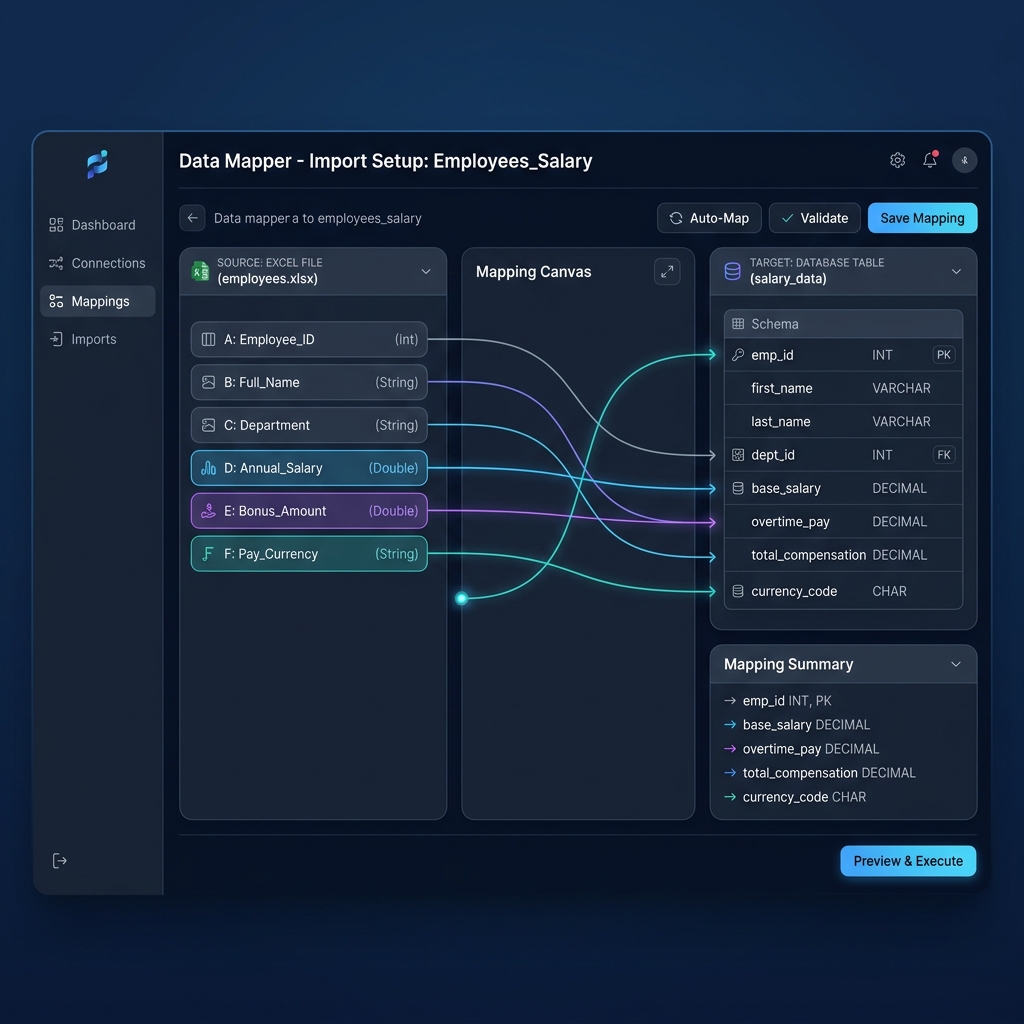
Try Our Interactive Demo Instantly
Want to see how an offline-capable, client-side payslip generator works in practice? Try our brand-new interactive demo right in your browser. Upload a sample CSV, map your columns, and generate beautifully designed PDF payslips—with zero data ever being transmitted to our servers.
Launch Free Demo NowChapter 1: The Technical Architecture of the Mail Merge Bottleneck
To understand why Word Mail Merge fails at payroll, one must understand how Microsoft engineered the mail merge pipeline in the late 1990s:
- Document-Centric Design:** Mail Merge was designed to merge database text records into a single continuous document template (such as an envelope address or letter body).
- Static Attachment Limitation:** In standard Outlook integration, the 'Attach File' dialog attaches a single static file to the outbound email envelope. The application has no internal concept of reading a file path from an Excel column and dynamically binding a unique attachment per row.
- Absence of PDF Encryption:** Microsoft Word's PDF export engine possesses no native feature to apply individual document-open passwords during a merge. Even if you could attach separate files, every payslip would be unencrypted, creating severe confidentiality and compliance violations.
Chapter 2: The Failure of Commercial Outlook Add-ins and Plugins
Faced with this limitation, many organizations purchase commercial Outlook add-ins (such as Mail Merge Toolkit or third-party COM extensions). While these plugins claim to solve the unique attachment problem, they introduce significant technical friction:
- Fragile COM Architecture:** Outlook COM add-ins are notorious for crashing. When Microsoft 365 deploys automatic background security patches, third-party plugins frequently become disabled or throw startup errors.
- Per-Seat Recurring Licensing:** Commercial plugins typically charge $50 to $120 per workstation annually. For an accounting department with three team members, this adds hundreds of dollars in unnecessary recurring software costs.
- MAPI Antivirus Warnings:** Outlook add-ins that trigger mass automated dispatches routinely trigger corporate security popups ('A program is trying to send an email on your behalf'), pausing the merge and corrupting the email queue.
Chapter 3: The Flaws of Complex VBA Mail Merge Macros
Advanced Excel users often attempt to solve the mail merge dilemma by authoring complex Visual Basic for Applications (VBA) scripts. A typical script attempts to: * Open an invisible instance of Word or Excel. * Loop through the rows of the payroll spreadsheet. * Save each record range as an individual PDF file to a temporary local folder. * Call external command-line utilities (like PDFtk or qpdf) to inject passwords. * Open an instance of Outlook MAPI and queue the outbound email.
While technically possible, this approach is extremely fragile. If any file path contains a special character, if an employee's name contains an apostrophe, or if Outlook takes longer than expected to acknowledge a socket connection, the script halts mid-batch with a cryptic runtime error. Administrators are left manually comparing sent folders to determine which employees received their salary advice.
Chapter 4: Comparison: Mail Merge Solutions for Payroll
Let us examine how different approaches compare when delivering 50 monthly employee payslips:
| Feature / Metric | Native Word Mail Merge | Outlook Add-in Plugins | Standalone Desktop (PayslipGen) |
|---|---|---|---|
| Unique PDF Attachments | ❌ Impossible natively | Supported via complex plugin | Native, automated out of the box |
| Individual Password Encryption | ❌ None | ❌ Rare / requires external tools | Native 128/256-bit AES encryption |
| Dependency on Local Outlook | 100% dependent on Outlook | 100% dependent on Outlook | Independent; connects direct to SMTP |
| Reliability on Microsoft Updates | Frequent macro blocks | Frequent add-in crashes | 100% stable native compiled software |
| Annual Cost | $0.00 (doesn't work) | $50 – $150/year per user | $49.00 One-Time Lifetime License |
| Processing Speed (50 Files) | N/A | 8 – 15 minutes | Under 60 seconds |
Chapter 5: How Standalone Desktop Engines Unify the Workflow
Modern local-first payroll software eliminates the artificial separation between data calculation, document rendering, encryption, and email delivery. By integrating all four functions into a single compiled application:
- Direct Data Parsing:** The software reads your raw Excel (
.xlsx) or CSV file without requiring Microsoft Office to be installed on the machine. - Headless PDF Generation:** High-resolution PDF payslips are rendered in background memory using native vector graphics.
- Inline Stream Encryption:** Before the PDF is written to disk, the engine applies an individual AES password derived from employee data.
- Direct Authenticated SMTP Dispatch:** The software communicates directly with your mail provider (Google Workspace, Office 365, or private mail server) over TLS, bypassing local Outlook client limitations entirely.
Chapter 6: Practical Implementation Guide
Here is how to execute an individualized payroll merge in three simple steps without add-ins or macros:
- Step 1: Organize Your Master File:** Ensure your Excel sheet contains columns for Employee Name, Email Address, Employee ID, and compensation totals.
- Step 2: Map Fields in PayslipGen:** Open the desktop application and drag your Excel file into the window. Confirm the visual column mapping for your payslip template.
- Step 3: Click 'Generate and Send':** The application automatically creates the individual PDFs, encrypts each document with the designated employee password, attaches the unique file to a personalized email greeting, and sends the batch with built-in anti-spam throttling.
Chapter 7: Real-World Case Study: 40-Employee Commercial Landscaping Fleet
The operational friction of attempting to force Word Mail Merge into a payroll system is illustrated by the experience of GreenScape Commercial Services, a landscaping and property maintenance company in Charlotte, North Carolina.
The company's office administrator spent months attempting to automate payroll delivery using Microsoft Word's Mail Merge. The workflow required maintaining complex VBA scripts found on internet forums, along with a commercial Outlook add-in that cost $89 per year.
Every few months, Microsoft would deploy an automated Office 365 update, causing the add-in to become disabled or throwing a Type Mismatch error in the VBA code. Whenever the script crashed midway through a merge, the administrator had to spend hours cross-referencing Outlook's Sent folder against the master spreadsheet to determine which workers had received their salary advice.
Even worse, the Word Mail Merge setup had no native ability to password-protect the PDF attachments. Every landscape laborer and equipment operator received an unencrypted PDF in their personal email, creating significant confidentiality concerns.
GreenScape discarded the entire Word Mail Merge setup and switched to PayslipGen: * They eliminated the $89/year Outlook add-in and all brittle VBA scripts. * They connected PayslipGen directly to their corporate Microsoft 365 email account via secure SMTP. * The software processes the master Excel sheet directly, generating 40 customized, AES-encrypted PDF payslips and dispatching them with personalized email greetings in 40 seconds flat.
Chapter 8: The Technical Architecture of Modern Streamlined Batch Merging
To understand why dedicated desktop software outperforms Word Mail Merge, consider the four-stage processing pipeline executed by modern local-first engines:
- In-Memory Tabular Ingestion:** The engine reads your spreadsheet rows sequentially, parsing data types, dates, and currency values directly into optimized memory structures without opening an external office application.
- Dynamic Vector PDF Assembly:** Instead of relying on a physical print driver, the headless graphics engine constructs the document layout using vector primitives, embedding typography, tables, and corporate logos with sub-pixel precision.
- Cryptographic Stream Sealing:** Before the document is finalized, the encryption module applies an AES cipher directly to the binary payload using the employee's designated password seed, rendering the file tamper-proof.
- Elimination of Temporary File Leftovers:** When custom scripts generate PDFs for Word Mail Merge, they write temporary files to local cache folders (). If the script terminates unexpectedly, unencrypted salary PDFs linger on the hard drive indefinitely. A dedicated desktop engine processes documents in volatile RAM and encrypts the stream before writing, leaving zero plain-text file remnants.
- Network Latency Tolerance:** Unlike Word Mail Merge which fails if a single network packet drops during an Outlook MAPI call, modern engines include automatic exponential backoff retry algorithms to handle transient network hiccups smoothly.
4. Asynchronous SMTP Queue Management: The delivery module queues the encrypted attachments, applies dynamic email body text, and initiates an asynchronous TLS connection to your mail server, ensuring rapid delivery with zero Outlook client dependencies.
Frequently Asked Questions
Why doesn't Microsoft simply add unique attachments to Word Mail Merge?
Microsoft has kept Word Mail Merge intentionally simple for general letter-writing for over twenty years. Dynamic attachments and document-level encryption require a specialized document engine that falls outside Word's core mission.
Do I need Microsoft Outlook installed to send payslips with PayslipGen?
No! PayslipGen operates independently of Microsoft Outlook. It connects directly to your email provider (Google Workspace, Microsoft 365, or any standard SMTP server) using secure TLS encryption.
Can I customize the email subject and body for each employee?
Yes. You can use dynamic merge tags in your email body such as {{EmployeeName}}, {{PayPeriod}}, and {{NetSalary}} to personalize every email message automatically.
What happens if my computer disconnects from the internet midway through a batch?
The software logs every successful delivery in real time. If connection is lost, you can simply click 'Retry Failed' to resume dispatch from the exact row where it paused without sending duplicates.
Why does Word Mail Merge require third-party add-ins to attach files?
Microsoft Word's core Mail Merge architecture was designed in the 1990s for physical paper printing. Email support was added as an afterthought, and Microsoft never integrated dynamic row-by-row file attachment handling into the core application.
Can I attach additional documents, like annual tax forms or company handbooks, alongside the payslip?
Yes! Dedicated payroll tools allow you to attach universal secondary files (such as company-wide announcements or policy updates) alongside the individual encrypted payslip in the same email dispatch.