
How to Send Bulk Payslips Using Custom SMTP (Amazon SES, SendGrid & Mailgun) with 99.9% Inbox Delivery
Key Takeaways
- ✓Standard webmail accounts (Gmail, Outlook) enforce strict burst rate limits (e.g. 500 emails/day or 20/min), causing 550 SMTP spam rejections during month-end bulk payroll runs.
- ✓Achieving 99.9% inbox deliverability requires correctly authenticated custom SMTP infrastructure backed by SPF, DKIM, DMARC DNS records, and enforced TLS 1.3 encryption.
- ✓Enterprise SMTP relays like Amazon SES dispatch thousands of encrypted payslips for just $0.10 per 1,000 emails, replacing expensive $50+/month SaaS email add-ons.
- ✓PayslipGen pairs local desktop PDF rendering with direct SMTP pipeline integration, automated pacing, pre-flight test sends, and real-time bounce tracking.
It is 4:45 PM on the final Friday of the month. You have spent hours meticulously reconciling timesheets, calculating overtime rates, factoring in tax withholdings, and generating hundreds of individual salary slips. You fire up your company’s standard email client, attach the first batch of 150 password-protected PDF payslips, and click send. Ten minutes later, your inbox is flooded with catastrophic error notifications: "550 5.7.1 Message rejected due to spam policy", "421 4.7.0 Rate limit exceeded", and "535 5.7.8 Authentication credentials invalid". Half your team received their salary advice; the other half is frantically texting HR asking why their pay stub hasn’t arrived.
This month-end nightmare is not a fluke—it is an architectural inevitability. Consumer email services like Gmail, Google Workspace, and Microsoft 365 were engineered for conversational human dialogue, not high-volume transactional PDF distribution. When an HR administrator attempts to blast hundreds of emails containing identical subject lines and heavy attachments within a five-minute burst, major Internet Service Providers (ISPs) classify the behavior as a compromised botnet executing a spam attack.
To achieve guaranteed, 99.9% inbox delivery for employee payslips without paying extortionate fees for cloud SaaS platforms, modern organizations must utilize Custom SMTP Infrastructure (such as Amazon SES, Twilio SendGrid, or Mailgun) integrated directly into local automation tools like PayslipGen. In this comprehensive technical guide, we will unpack the mechanics of email deliverability, break down authentication protocols (SPF, DKIM, DMARC), provide step-by-step setup walkthroughs for enterprise SMTP providers, and demonstrate how to dispatch thousands of confidential payslips flawlessly for pennies.
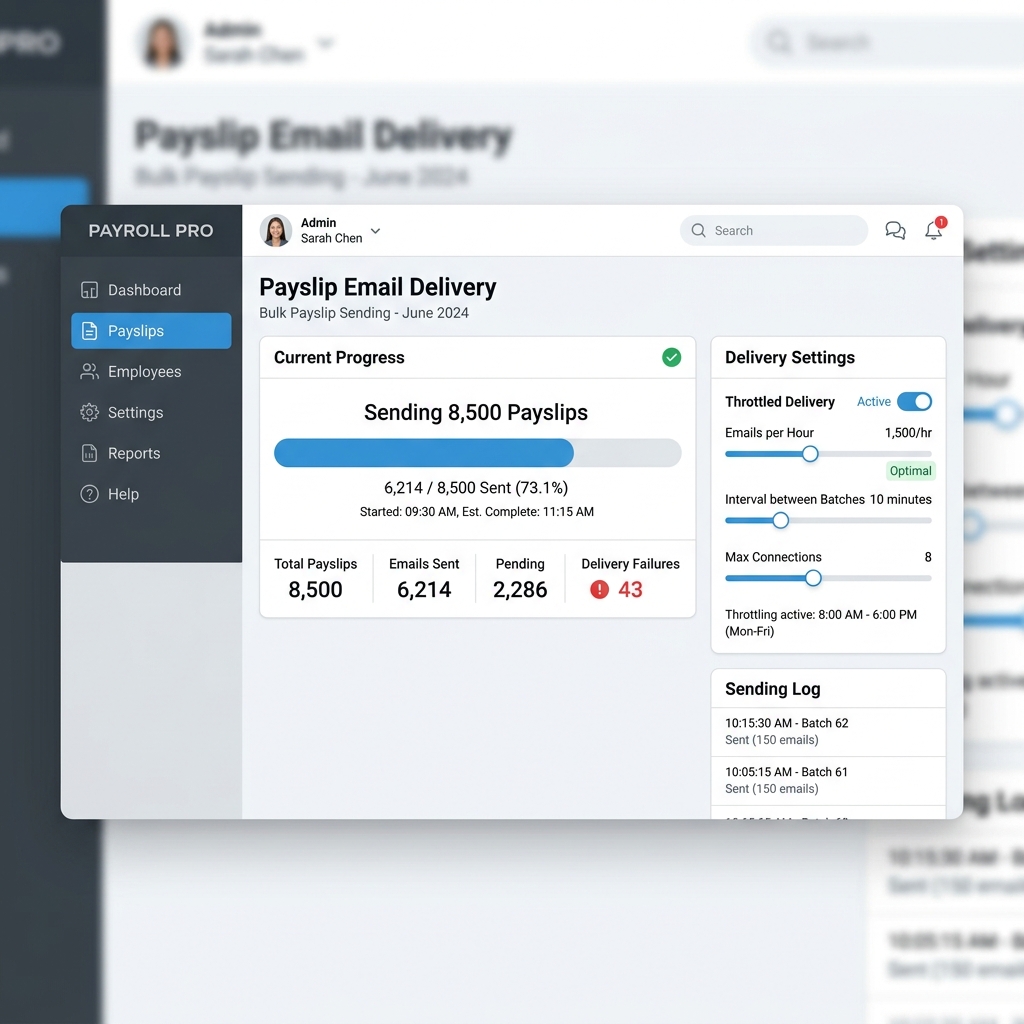
Try Our Interactive Demo Instantly
Want to see how an offline-capable, client-side payslip generator works in practice? Try our brand-new interactive demo right in your browser. Upload a sample CSV, map your columns, and generate beautifully designed PDF payslips—with zero data ever being transmitted to our servers.
Launch Free Demo NowChapter 1: The Anatomy of Month-End Email Throttling
To solve email delivery failures, you must first understand why standard webmail and office suites fail so spectacularly during payroll runs.
1. The Burst Rate Limit Trap
Google Workspace and Microsoft 365 enforce strict hourly and daily sending thresholds to protect their IP ranges from being blacklisted. For instance, while a Google Workspace account may quote a nominal limit of 2,000 messages per day, it enforces a much tighter hidden burst rate limit—often no more than 20 to 30 messages per minute.
When an HR administrator sends 200 payslips in a 60-second window, Google’s automated heuristic monitors immediately trip. The SMTP socket is forcefully severed with a 421 4.7.0 Service not available or 452 4.5.3 Too many recipients error code. Worse yet, subsequent messages are silently queued, delayed by up to 24 hours, or dumped straight into the recipient's Junk folder.
2. PDF Attachment Heuristics & Anti-Spam Triggers
Spam filters evaluate dozens of document telemetry points before delivering an email to a user's primary inbox. When an account sends 100 emails that share:
- Virtually identical message bodies (e.g., "Please find your monthly payslip attached")
- Identical subject patterns (e.g., "Payslip - August 2026")
- A password-encrypted binary attachment (.pdf) that automated scanners cannot inspect for malicious payloads
- Zero historical recipient reply activity (employees rarely reply to automated payroll emails)
Spam classification engines like SpamAssassin, Google Postmaster, and Microsoft Defender score the email blast with an elevated risk rating. Without specialized transactional sender reputation and correct cryptographic signatures, your payslip emails will be unceremoniously routed to Spam or outright dropped.
The Danger of Damaging Your Corporate Domain Reputation
Attempting to force high-volume bulk payslips through your primary corporate email inbox (e.g., hr@yourcompany.com on Outlook or Gmail) degrades your domain’s global sender score. If your domain gets flagged, normal day-to-day sales, customer support, and executive emails will start landing in external clients' spam folders.
Chapter 2: Understanding SMTP, SPF, DKIM, DMARC & TLS
Guaranteeing 99.9% inbox delivery requires moving your bulk dispatch workflow to a dedicated transactional SMTP relay backed by the four pillars of modern email authentication.

1. SMTP (Simple Mail Transfer Protocol)
SMTP is the foundational Internet standard for electronic mail transmission. When using a desktop automator like PayslipGen, the application establishes a direct, low-level TCP/IP connection to a specialized SMTP server over Port 587 (STARTTLS) or Port 465 (SSL/TLS). This completely decouples your payroll dispatch from desktop client software like Outlook or Apple Mail.
2. SPF (Sender Policy Framework)
SPF is a DNS record published by your domain owner that lists all authorized IP addresses and servers permitted to send email on behalf of your domain.
When a recipient mail server receives a payslip from payroll@yourcompany.com via Amazon SES, it checks your domain's SPF record. If include:amazonses.com is present, the message passes SPF validation immediately.
3. DKIM (DomainKeys Identified Mail)
DKIM provides cryptographic proof that the email was genuinely sent by the domain owner and that neither the email body nor the PDF attachment was tampered with in transit.
Your SMTP provider generates a private key that signs outgoing message headers with a digital hash. You publish the corresponding public key as a DNS TXT or CNAME record (e.g., ses._domainkey.yourcompany.com). The receiving server verifies the hash against the public key. If the signature matches, the email is certified authentic.
4. DMARC (Domain-based Message Authentication, Reporting & Conformance)
DMARC ties SPF and DKIM together by declaring a formal policy instructing recipient servers on how to handle emails that fail authentication.
Enforcing a valid DMARC policy tells Gmail, Yahoo, and Outlook that your organization takes identity protection seriously, dramatically elevating your domain reputation and ensuring your salary emails skip the spam bin.
5. Mandatory TLS 1.2 / 1.3 Transport Encryption
Because salary documents contain critical financial and Personally Identifiable Information (PII), transmitting them over unencrypted cleartext SMTP (Port 25) is a gross violation of privacy regulations like GDPR, HIPAA, and CCPA. Modern SMTP relays enforce TLS (Transport Layer Security) encryption, ensuring the data channel between your desktop automator and the mail server is mathematically impenetrable to man-in-the-middle packet sniffing.
Chapter 3: Step-by-Step Setup with Top Enterprise SMTP Providers
Let’s examine how to configure the top three enterprise-grade SMTP relays for use with PayslipGen.
Option A: Amazon SES (Simple Email Service) — The Gold Standard for Cost & Speed
Amazon SES is by far the most reliable and cost-effective bulk mail transport on Earth. It is engineered to handle billions of transactional messages per day at negligible cost ($0.10 per 1,000 emails).
Amazon SES Configuration Checklist
- Create AWS Account: Navigate to the AWS Console and search for Amazon SES.
- Verify Domain Identity: Under Configuration → Verified Identities, click Create Identity, select Domain, and input your company domain (e.g.
yourcompany.com). - Add CNAME Records: Amazon SES will provide three CNAME records for Easy DKIM. Add these records to your DNS manager (Cloudflare, GoDaddy, Namecheap, Route 53).
- Request Production Access: New SES accounts begin in sandbox mode (which only permits sending to pre-verified emails). Click Request Production Access, select Transactional/System emails, specify your use-case as "Internal employee payroll delivery", and approval is typically granted within 6–12 hours.
- Generate SMTP Credentials: Navigate to Account Dashboard → SMTP Settings → Create SMTP Credentials. AWS will create a dedicated IAM user and output an SMTP Username and SMTP Password.
| Parameter | Recommended SES Setting | Notes |
|---|---|---|
| SMTP Host | email-smtp.us-east-1.amazonaws.com | Use the region matching your verified identity |
| Port | 587 | Port 587 uses STARTTLS; Port 465 uses SSL |
| Encryption | STARTTLS / TLS | Guarantees in-transit cryptographic protection |
| Username | AKIAIOSFODNN7EXAMPLE | Generated from AWS IAM SMTP console |
| Password | BOm... (44-character secret) | Keep securely stored in PayslipGen settings |
Option B: Twilio SendGrid
SendGrid is another ubiquitous transactional email provider offering rapid setup and a user-friendly web interface.
- Log into SendGrid and navigate to Settings → Sender Authentication to authenticate your domain with SPF/DKIM DNS records.
- Go to Settings → API Keys and click Create API Key with "Full Access" or restricted "Mail Send" permissions.
- In PayslipGen, set the SMTP Host to
smtp.sendgrid.net, Port to587, the Username to the exact stringapikey, and paste your generated API Key as the Password.
Option C: Mailgun by Sinch
Mailgun is renowned for its granular log retention, webhook telemetry, and automated IP warmup capabilities.
- Add your sending subdomain (e.g.,
mail.yourcompany.com) in the Mailgun control panel. - Configure the provided SPF, DKIM, and MX DNS verification records.
- Navigate to Domain Settings → Sending Keys and copy your default SMTP credentials.
- In PayslipGen, configure SMTP Host as
smtp.mailgun.orgon Port587.
Option D: Microsoft 365 Authenticated SMTP Relay (For Small Teams)
If your organization has under 50 employees and prefers using your existing Microsoft 365 tenant:
- SMTP Host:
smtp.office365.com - Port:
587(STARTTLS) - Username:
payroll@yourcompany.com - Authentication: App Password generated from Microsoft Security Center (bypassing Multi-Factor Authentication prompts for automated background processes).
Chapter 4: Configuring SMTP in PayslipGen for Flawless Bulk Dispatch
Unlike generic spreadsheet plugins or brittle Outlook mail merge scripts, PayslipGen provides a dedicated, enterprise-grade SMTP dispatch engine built right into the desktop client.
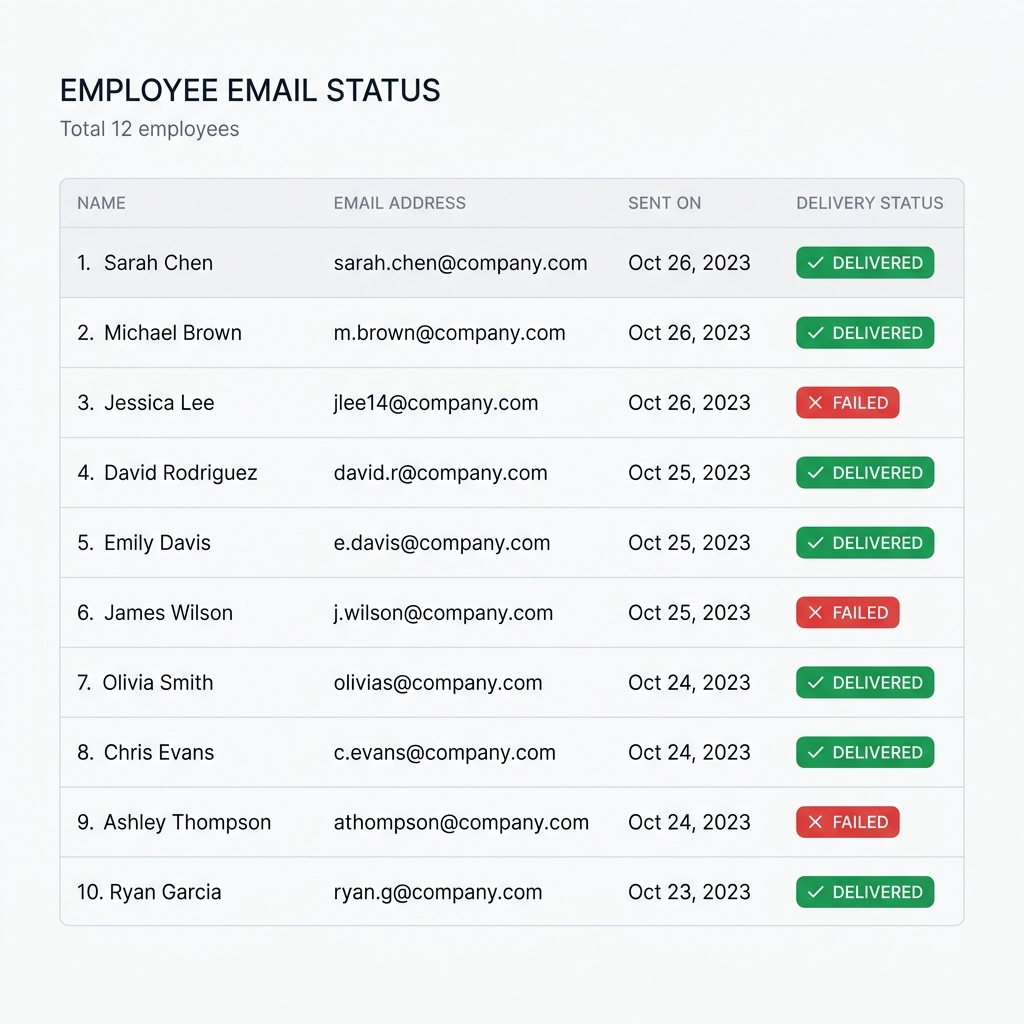
The Step-by-Step PayslipGen Dispatch Workflow
- One-Time SMTP Setup: Open PayslipGen, navigate to Settings → Email / SMTP. Enter your Host, Port, Username, and Password. Check the Enable TLS Encryption toggle.
- Pre-Flight Test Send: Click the "Send Test Email" button. Enter your own email address. PayslipGen will establish a socket connection, handshake with the mail server, verify authentication headers, and dispatch a test sample PDF in under two seconds.
- Import Excel/CSV & Map Columns: Import your monthly payroll spreadsheet. Map the employee email column to
Recipient Emailand dynamic fields likeFirst Name,Net Pay, andPay Period. - Dynamic Email Template Customization: Compose a sleek, professional message using merge variables:
Subject: Confidential: Your Salary Slip for {{Month_Year}} - {{Company_Name}}
Dear {{First_Name}},
Please find attached your official salary slip for the period ending {{Pay_Date}}.
For your privacy and security, this document has been encrypted. Your password is the last 4 digits of your National ID / SSN combined with your birth year (e.g.
98761988).Warm regards,
Finance & HR Operations Team - Pacing & Concurrency Controls: PayslipGen includes an automated pacing governor that sends messages at an optimal cadence (e.g. 5 to 10 emails per second with randomized jitter), preventing upstream ISPs from ever triggering rate-limiting alarms.
- Execute Dispatch: Click "Generate & Send All". Watch the live progress dashboard as individual password-protected PDFs are generated and delivered simultaneously across parallel worker threads.
Chapter 5: Bounce Tracking, Delivery Verification & Error Recovery
In payroll, a 95% delivery rate is an unacceptable 5% failure rate. If 5 out of 100 employees miss their payslips, HR loses hours fielding complaints and manually emailing files.
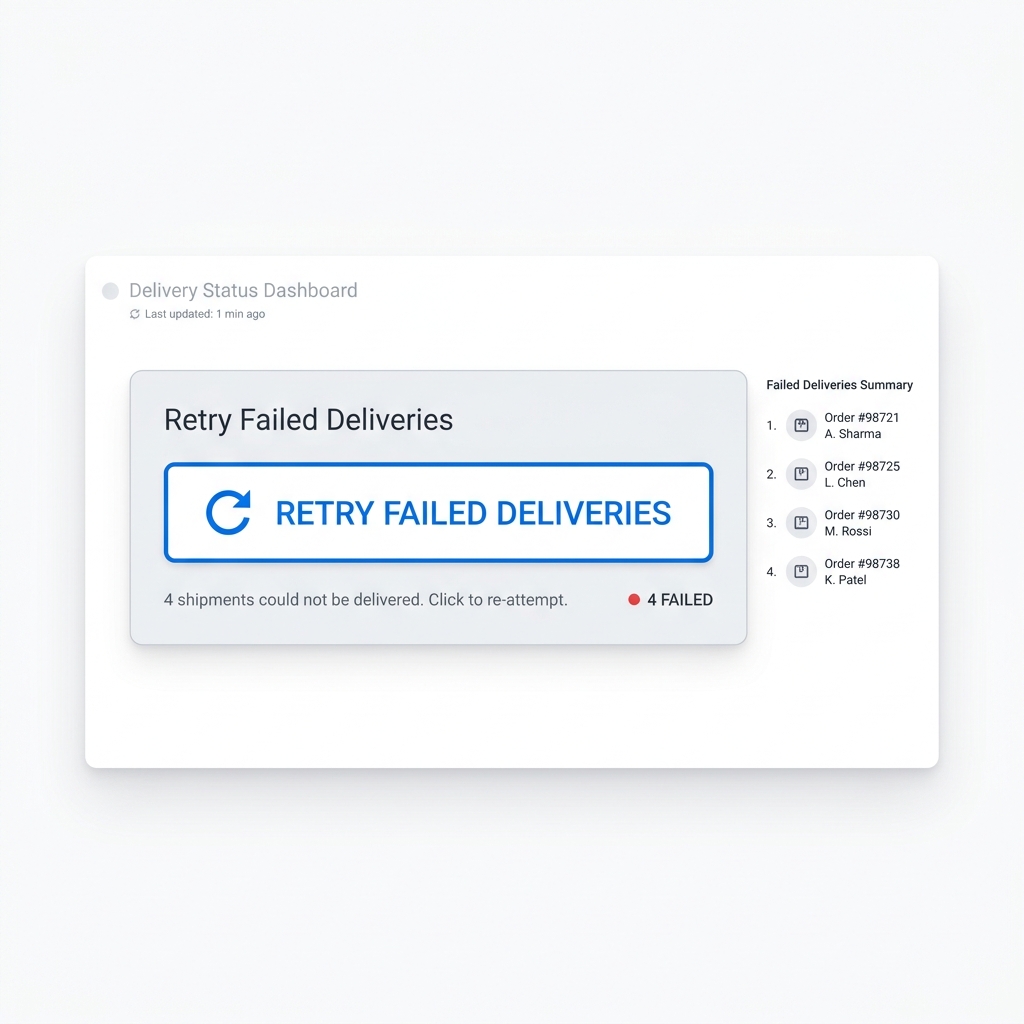
Handling Hard Bounces vs. Soft Bounces
PayslipGen categorizes dispatch exceptions into actionable categories:
- Hard Bounces (5XX Errors): The recipient address does not exist (e.g.
john.doe@invalid-domain.com) or the mailbox is permanently disabled. PayslipGen flags the row in red, logs the exact server response, and allows the HR manager to correct the typo and re-send with a single click. - Soft Bounces (4XX Errors): Temporary issues such as recipient mailbox full or temporary network timeout. PayslipGen automatically invokes exponential backoff retries, re-attempting delivery 3 times over 15-minute intervals.
For organizations with strict compliance policies, PayslipGen generates an exportable Audit Log (CSV/PDF) recording the exact Timestamp, Employee ID, Recipient Email, Message ID, and Delivery Status for every transaction. This provides airtight proof of compliance during statutory labor audits. Read our complete guide on Tracking and Retrying Missing Payslips.
Chapter 6: Financial Breakdown - Custom SMTP vs. SaaS Subscriptions
Many enterprise cloud payroll platforms charge hefty add-on fees for automated email distribution, or force you into higher-tier plans ($50 to $150 per month) just to unlock bulk emailing capabilities.
Let’s compare the true cost of sending 500 payslips per month over a 3-year period:
| Cost Factor | Cloud SaaS Payroll Provider | PayslipGen + Amazon SES |
|---|---|---|
| Monthly Software License | $120.00 / mo ($40 base + $4/employee) | $0.00 / mo ($49 one-time purchase) |
| Email Delivery Cost (500 sends) | Included in subscription | $0.05 / mo (Amazon SES) |
| Year 1 Total Cost | $1,440.00 | $49.60 |
| Year 3 Cumulative Cost | $4,320.00 | $50.80 |
| Total 3-Year Savings | — | +$4,269.20 (98.8% Savings) |
Chapter 7: Frequently Asked Questions (FAQ)
Why can't I just use regular Gmail or Outlook to send my payslips?
Standard Gmail and Outlook accounts are designed for personal or one-on-one professional communication. When you send dozens or hundreds of emails with identical subject lines and encrypted PDF attachments in rapid succession, anti-spam systems flag the account as compromised. This leads to temporary account suspension, 550 spam rejections, and delays of up to 24 hours. Dedicated SMTP relays like Amazon SES or SendGrid are specifically built for high-speed, high-reputation transactional delivery.
How much does Amazon SES cost for a small business?
Amazon SES costs $0.10 per 1,000 emails sent (and $0.12 per GB of attachments). If you have 200 employees and send one payslip per month with a 150KB PDF attachment, your total monthly AWS bill will literally be around $0.03 to $0.05. It is virtually free compared to any SaaS subscription.
Are password-protected PDF attachments safe to send over custom SMTP?
Yes. When combined with mandatory TLS transport encryption and individual AES-256 password encryption on the PDF itself, sending payslips via custom SMTP is one of the most secure distribution methods available. The document is protected both in flight across the internet and at rest in the recipient’s mailbox.
Can I use my existing company domain (e.g., payroll@mycompany.com) as the sender?
Absolutely. When you verify your domain in Amazon SES, SendGrid, or Mailgun using SPF and DKIM DNS records, all outgoing emails will officially show as sent from payroll@yourcompany.com. There are no third-party branding footers or "sent via" warnings.
What happens if an employee's email bounces?
PayslipGen monitors the SMTP socket response codes in real time. If a message bounces due to an invalid email address (hard bounce) or a full inbox (soft bounce), the row is immediately flagged on the dashboard with the exact server error message. You can update the email address and re-send that single payslip with a single click without re-running the entire payroll batch.
Does PayslipGen store my SMTP passwords in the cloud?
No. PayslipGen is a 100% offline desktop application. Your SMTP credentials, employee database, and financial records are stored exclusively on your local computer in an encrypted vault. No third-party servers ever touch your credentials or employee data.
Master 99.9% Bulk Payslip Delivery Today
Stop battling Gmail rate limits and spam filters. Automate your monthly payroll distribution with local speed, military-grade password protection, and custom SMTP delivery for a one-time fee.
Get PayslipGen for $49 (One-Time)Conclusion
Month-end payroll distribution should be a seamless, five-minute task—not a stressful gamble with spam filters and throttled mailboxes. By pairing a purpose-built local desktop engine like PayslipGen with an enterprise transactional SMTP service like Amazon SES or SendGrid, you eliminate deliverability headaches forever.
You gain total sovereignty over your payroll data, deliver bulletproof password-protected salary slips directly into your employees' inboxes, and eliminate hundreds of dollars in recurring SaaS fees every single year.