
How to Bulk Password Protect PDF Payslips with Employee Date of Birth from Excel
Key Takeaways
- ✓The Human Error Threat: Emailing unencrypted payslips is the single largest source of reportable data breaches in corporate HR. A single mistyped email address or autocomplete mistake exposes an employee's salary, national tax ID, and banking details.
- ✓Why Date of Birth (DOB) Is the Corporate Standard: Using a dynamic credential that the employee already memorized (such as
DDMMYYYYorYYYYMMDD) eliminates 90% of "lost password" helpdesk tickets while satisfying statutory data-at-rest encryption requirements. - ✓Adobe Acrobat & Mail Merge Failures: Standard tools like Microsoft Word Mail Merge and Adobe Acrobat Pro cannot dynamically assign individual, unique passwords to hundreds of distinct PDFs from a spreadsheet row without brittle, unmaintainable scripts.
- ✓Automated Local AES-256 Batching: With PayslipGen, employers can map any Excel date column (DOB, Hire Date, or National ID) directly into an AES-256 PDF encryption engine that locks each document locally before automated SMTP dispatch.
Every payroll officer and HR administrator has experienced that split-second jolt of sheer panic right after hitting "Send" on an email batch: Did Sarah from Marketing just receive Dave from Engineering's salary breakdown?
In modern corporate administration, a payslip is not merely a receipt of payment. It is a concentrated dossier of an individual's most sensitive Personally Identifiable Information (PII). A standard pay voucher contains an employee's full legal name, residential home address, Social Security or National Insurance number, gross earnings, net pay, retirement contributions, voluntary medical deductions, and frequently their bank account and routing transit numbers.
Under global data protection statutes—including the European Union and UK General Data Protection Regulation (GDPR Article 32 & 33), the California Consumer Privacy Act (CCPA/CPRA), and South Africa's POPIA—emailing an unencrypted PDF payslip across public mail exchange networks constitutes a severe compliance violation. If that email is misdirected, intercepted, or forwarded, your organization faces statutory notification requirements, forensic audit mandates, and crippling regulatory penalties.
In this comprehensive engineering guide, we examine why password-protecting PDF payslips with each employee's unique Date of Birth (DOB) has emerged as the global best practice. We analyze the technical failures of legacy tools like Microsoft Word and Adobe Acrobat, provide the exact Excel formatting blueprint to prepare your employee roster, and demonstrate how you can automatically generate, encrypt, and dispatch hundreds of unique password-protected payslips locally with PayslipGen.

Try Our Interactive Demo Instantly
Want to see how an offline-capable, client-side payslip generator works in practice? Try our brand-new interactive demo right in your browser. Upload a sample CSV, map your columns, and generate beautifully designed PDF payslips—with zero data ever being transmitted to our servers.
Launch Free Demo NowChapter 1: The Anatomy of a Payroll Data Breach & Legal Consequences
Why are regulatory bodies like the UK Information Commissioner's Office (ICO) and European Data Protection Authorities so uncompromising when it comes to payroll transmissions?
Consider what occurs when an email containing an unencrypted payslip is misdirected:
- The Autocomplete Trap: An HR clerk begins typing "John Davies" into the recipient field. Microsoft Outlook autocompletes "John Davis"—an external vendor or an unrelated colleague in another branch. Within seconds, an employee's confidential net earnings, wage garnishment orders, and home address are in the hands of an unauthorized third party.
- Interception on Shared Inboxes: Many small businesses have employees using departmental or shared inboxes (e.g.,
sales@company.comor family email accounts). An unencrypted attachment is visible to anyone who has access to that mailbox or mobile device notification screen. - Mail Server Snooping & Open Relays: Standard SMTP routing traverses multiple intermediate mail transfer agents (MTAs). While opportunistic TLS encrypts the transit pipe when supported, email attachments remain stored in plain text on unencrypted mail servers, corporate archives, and backup caches.
Under UK GDPR Article 83, regulatory bodies can impose administrative fines of up to £17.5 million or 4% of total worldwide annual turnover for failure to implement appropriate technical and organizational measures (TOMs) to secure PII.
Furthermore, under Article 33, any breach exposing banking or national identification numbers must be reported to the supervisory authority within 72 hours, triggering mandatory formal written notifications to affected employees, reputation destruction, and potential civil lawsuits for distress.
Encrypting the PDF attachment with a strong symmetric cipher (AES-128 or AES-256) transforms the document into unreadable ciphertext. Even if the email lands in the wrong inbox, an unauthorized recipient cannot open or inspect the contents without the decryption key.

Chapter 2: Why Date of Birth (DOB) Is the Optimal Corporate Encryption Key
When implementing password protection across an organization, security engineers face the classic trade-off between cryptographic entropy and human usability.
If you require employees to generate, remember, and manage a random 16-character alphanumeric password for their monthly payslips:
- Employees will lose the password within 30 days.
- Your HR and payroll team will spend the first three days of every month answering frantic emails: "What is my payslip password? I can't open my PDF."
- Frustrated staff will ask colleagues or write the password on sticky notes, completely defeating the security intent.
Conversely, using a shared master company password (e.g., Company2026!) for everyone is functionally useless. If one employee receives another colleague's payslip by mistake, the shared password allows them to open it immediately.
The Golden Ratio: Personalized, Pre-Shared Credentials
The industry standard adopted by enterprise banks, government treasuries, and leading payroll bureaus is to construct passwords from a piece of deterministic PII that is known only to the individual employee and the HR department:
| Credential Pattern | Formula Format | Example Output | Operational Assessment |
|---|---|---|---|
| Standard 8-Digit DOB (UK/Commonwealth) | DDMMYYYY | 14071988 | Most popular. Zero helpdesk inquiries; intuitive for employees. |
| ISO Standard DOB | YYYYMMDD | 19880714 | Excellent for multi-national workforces with differing day/month conventions. |
| Hybrid Name + Year of Birth | First4LettersCaps + YYYY | JOHN1988 | High resistance against casual guessing while remaining memorable. |
| Employee ID + Last 4 of Tax ID | EMP_ID + SSN_Last4 | EMP4092-7812 | Bank-grade isolation. Requires access to internal company badge or tax records. |
Chapter 3: Why Traditional Tools (Word Mail Merge & Acrobat) Fail at Bulk Encryption
If password protecting PDF payslips with Date of Birth is so vital, why do so many companies still fail to do it? The bottleneck is software tooling.
The Microsoft Word Mail Merge Limitation
Microsoft Word and Excel have possessed Mail Merge capabilities for three decades. You can easily populate employee names, salaries, and addresses into a Word template. However:
- No Native PDF Password Assignment: Word Mail Merge can output merged documents or send plain text emails. It has zero capability to assign a distinct password to each output file based on an Excel column.
- No Attachment Isolation: When Word merges to email, it embeds the body text into the message. It cannot generate a separate encrypted PDF attachment and hook it into Outlook without third-party Visual Basic (VBA) macros.
- Fragile VBA Macro Nightmare: Thousands of companies attempt to bypass this with custom VBA scripts utilizing CDO or Outlook COM objects. However, with Microsoft's recent security enforcement blocking Mark of the Web (MOTW) macros and stripping COM support from the "New Outlook for Windows," these scripts break constantly and leave administrators stranded.
The Adobe Acrobat Pro Bottleneck
Adobe Acrobat Pro allows you to set passwords on PDF files under Tools > Protect > Encrypt with Password. But Acrobat is fundamentally a single-document editor. To encrypt 150 payslips in Adobe Acrobat:
- You must open Employee #1's PDF.
- Navigate to the security menu.
- Manually type their specific Date of Birth.
- Save and close the file.
- Repeat this manual process 149 more times every single payroll cycle.
This manual workload is absurd, error-prone, and unsustainable for any growing business.
Chapter 4: The Master Excel Blueprint for DOB-Protected Payslips
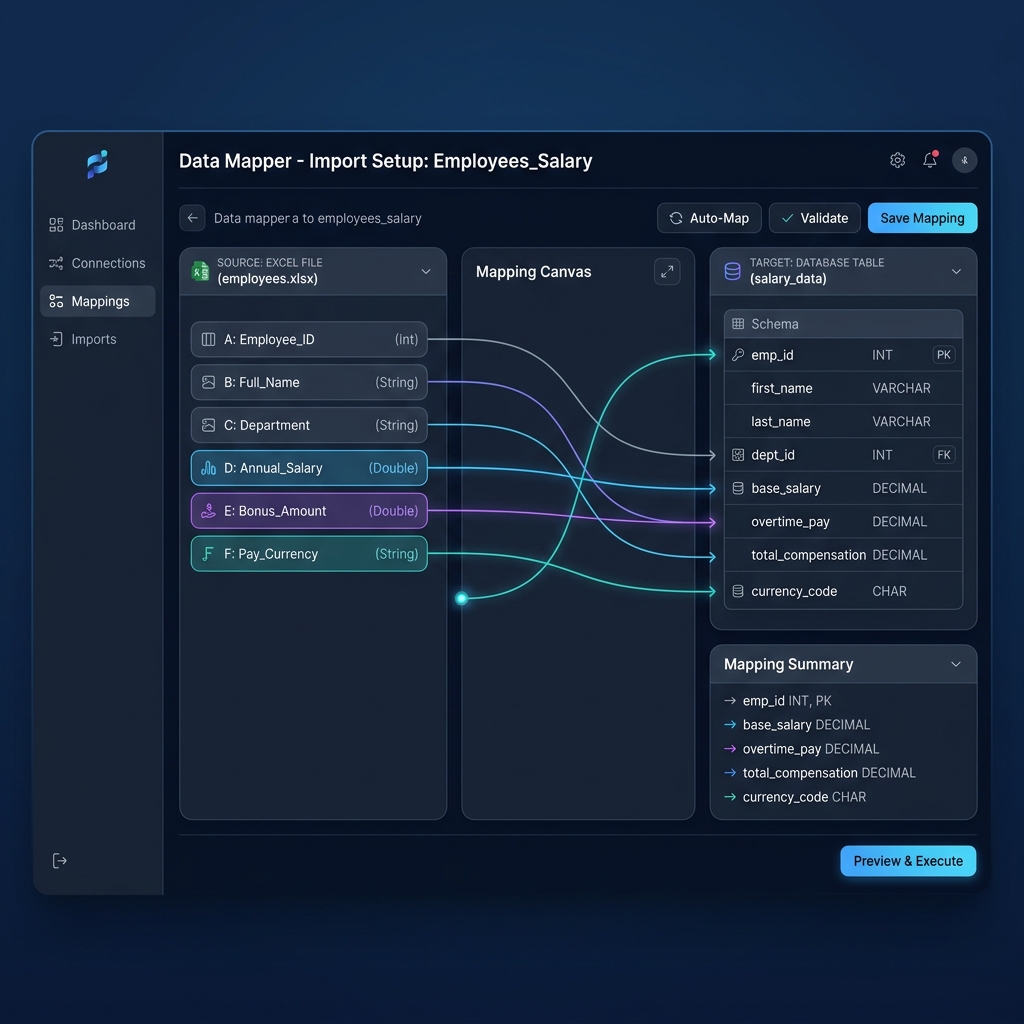
Setting up your payroll spreadsheet for automated bulk password encryption is remarkably simple. You only need to structure your columns so that each employee row has an explicit, formatted password string.
| Column Header | Sample Value | Excel Formula / Format Rule | System Mapping Purpose |
|---|---|---|---|
| Employee_ID | EMP-1042 | Plain text | Unique identifier & PDF filename token |
| Full_Name | Eleanor Vance | Plain text | Displays on payslip & email salutation |
| Email_Address | eleanor.vance@company.com | Validated email format | Target recipient for encrypted attachment |
| Raw_DOB | 1992-04-18 | Date format (YYYY-MM-DD) | HR source record |
| PDF_Password | 18041992 | =TEXT(D2, "ddmmyyyy") | Dedicated encryption key column for PayslipGen |
| Gross_Pay | 5400.00 | Currency format | Earnings table line item |
| Net_Salary | 4120.50 | =Gross_Pay - Deductions | Disbursement check amount |
Excel frequently stores dates as serial numbers (e.g., 33712). If you pass a raw Excel date directly into a password field, the output might be evaluated as a serial integer rather than a calendar string. Always create a dedicated column using the formula =TEXT(DateCell, "ddmmyyyy") or =TEXT(DateCell, "yyyymmdd"). This guarantees that the password string is exported as clean, literal digits.
Chapter 5: Step-by-Step: Bulk Encrypting & Emailing with PayslipGen
PayslipGen was built from the ground up to solve the exact problem of bulk, encrypted PDF payslip generation and distribution without relying on third-party cloud servers.
Here is the exact 4-step workflow to generate and email hundreds of password-protected payslips in under three minutes:
Step 1: Drag and Drop Your Payroll Spreadsheet
Launch the native desktop application on your Windows, Mac, or Linux workstation. Drag your .xlsx or .csv spreadsheet into the dropzone. PayslipGen ingests the data 100% locally in memory—zero bytes of your confidential payroll roster are ever uploaded to the cloud.
Step 2: Map Your Password and Identity Columns
PayslipGen's Smart Column Mapper automatically detects common header names. Select:
- Password Field: Map to your
PDF_PasswordorDOBcolumn. - Recipient Email: Map to your
Email_Addresscolumn. - Employee Name & Earnings: Map to your standard gross, tax, and net pay headers.
Step 3: Enable AES-256 PDF Encryption
Toggle the PDF Security Shield in the settings panel. PayslipGen applies true military-grade 256-bit AES encryption. Unlike weak PDF permissions passwords (which can be easily stripped with online tools), AES document-open encryption prevents the PDF from rendering or decrypting without the exact password string.
Step 4: Configure Email Dispatch with Automated Instructions
Under the Email Distribution tab, configure your company SMTP server (Google Workspace, Microsoft 365, Amazon SES, or custom corporate mail server).
You can personalize the email body with dynamic tags, explicitly informing the employee how to unlock their document:
// Sample Email Template Body in PayslipGen
Hi {{Employee_Name}},
Your payslip for the period {{Pay_Period}} is attached as a secure, password-protected PDF.
🔒 Password Instructions:
To open your payslip, please enter your 8-digit Date of Birth in the format DDMMYYYY (e.g., if you were born on April 18, 1992, your password is 18041992).
If you have any questions regarding your earnings or deductions, please contact the Payroll Department.
Best regards,
{{Company_Name}} Payroll Team

Chapter 6: Operational Best Practices & Deliverability Guidelines
When dispatching hundreds of encrypted PDF attachments, following sound email hygiene and deliverability protocols is essential to prevent messages from landing in the spam folder or triggering mail server rate-limits:
- Configure SPF, DKIM, and DMARC: Major mail receivers (Google Workspace, Yahoo, Microsoft 365) strictly reject bulk automated emails originating from unauthenticated domains. Ensure your sending domain has valid SPF records (
v=spf1 include:... ~all) and aligned DKIM cryptographic signatures. - Implement Batch Rate-Limiting (Throttling): Blasting 300 emails in 5 seconds through a standard corporate SMTP gateway will trip automated spam filters and temporarily blacklist your IP. PayslipGen includes built-in throttling, allowing you to space out deliveries (e.g., 10 emails every 3 seconds) for flawless inbox placement.
- Run a Pre-Flight Test Batch: Always send a test batch of 2–3 records to internal test mailboxes before executing a company-wide dispatch. Verify that the PDF opens cleanly with the designated test password, images render crisply, and table alignments match your corporate branding.
- Provide an Internal FAQ for Onboarding: During employee onboarding, provide new hires with a one-page payroll reference sheet explaining that all monthly payslips are encrypted with their Date of Birth. This preempts support queries before the first pay cycle.
Frequently Asked Questions (FAQs)
Can employees remove the password after opening their payslip?
Yes. Once an employee enters their valid password to open their PDF in Adobe Acrobat, Apple Preview, or a web browser, they can choose "Print to PDF" or "Save as Unprotected Copy" on their personal computer if they need to submit the document to a mortgage lender or bank without password restrictions.
What happens if an employee forgets or enters the wrong password?
Because the password was generated directly from your master Excel roster using their Date of Birth or Employee ID, HR administrators can look up the exact formula value in seconds without needing to reset cryptographic tokens or re-generate the file.
Is AES-256 PDF password protection compliant with GDPR Article 32?
Yes. GDPR Article 32 explicitly references "the pseudonymisation and encryption of personal data" as an essential technical measure. Encrypting payslips with per-recipient AES-256 keys ensures that even if an email is intercepted or forwarded in error, the underlying personal data remains completely inaccessible to unauthorized parties.
Can I use other credentials instead of Date of Birth, like Employee ID or SSN-4?
Absolutely. PayslipGen allows you to designate anycolumn from your spreadsheet as the dynamic password key. You can use Employee IDs, the last 4 digits of National Insurance/SSN, Date of Joining, or a concatenated string combining the employee's surname with their birth year.
Does PayslipGen send my employee data or passwords to any external server?
No. PayslipGen is a 100% standalone desktop application. All spreadsheet parsing, PDF rendering, AES-256 cryptographic encryption, and SMTP packet assembly occur exclusively on your local computer. Your payroll records, salaries, and employee passwords never touch our servers or any cloud database.
Can I send encrypted payslips using our corporate Microsoft 365 or Google Workspace account?
Yes. PayslipGen connects directly to any authenticated SMTP provider, including Microsoft 365 (Office 365 SMTP Relay), Google Workspace (using App Passwords or standard SMTP), Amazon SES, SendGrid, or private on-premises mail servers.
Secure Your Payroll Email Distribution Today
Generate hundreds of professional, AES-256 password-protected PDF payslips directly from your Excel spreadsheet and email them securely with zero cloud exposure.
Get PayslipGen for $49 (Lifetime Access)Conclusion: Zero-Trust Security for Your Monthly Payroll
Protecting employee compensation data is no longer an optional administrative luxury—it is a legal, operational, and ethical imperative. Relying on unencrypted PDF attachments or fragile, unmaintained Word mail merge macros is an unnecessary gamble with your organization's reputation and regulatory compliance.
By combining a structured Date of Birth convention in Excel with the native, high-performance encryption engine of PayslipGen, you eliminate the risk of accidental PII leakage, satisfy GDPR and CCPA technical safeguard mandates, and provide your team with seamless, professional payslip delivery every single pay cycle.
(Looking to streamline other aspects of your payroll? Check out our complete guides on Creating Password-Protected Payslips Automatically, GDPR Compliant Email Distribution, or how to Send Bulk Payslips via Amazon SES.)